
템플릿
Metaplex Solana NextJs Tailwind 템플릿
프론트엔드 프레임워크로 Nextjs와 Tailwind를 활용하고 사용 편의성을 위해 Metaplex Umi, Solana WalletAdapter, Zustand 전역 스토어가 미리 설치된 다운로드 가능하고 재사용 가능한 템플릿입니다.
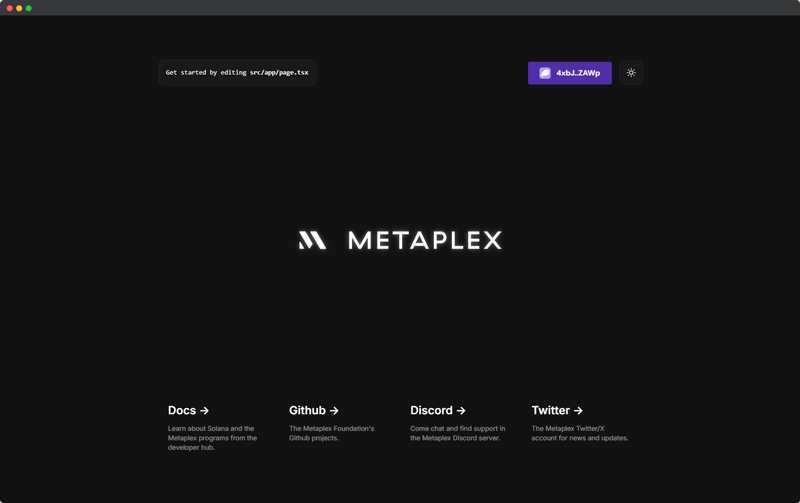
기능
- Nextjs React 프레임워크
- Tailwind
- Solana WalletAdapter
- Metaplex Umi
- Zustand
- 다크/라이트 모드
- Umi 헬퍼
설치
현재 약간 다른 구성과 UI 프레임워크/컴포넌트 라이브러리를 가진 Next JS용 여러 템플릿을 사용할 수 있습니다.
Tailwind
git clone https://github.com/metaplex-foundation/metaplex-nextjs-tailwind-template.git
Tailwind + Shadcn
git clone https://github.com/metaplex-foundation/metaplex-nextjs-tailwind-shadcn-template.git
다음 섹션들은 이 페이지에 나열된 모든 템플릿이 공유하는 공통 기능을 다룹니다. 템플릿별 기능은 여기에 포함되지 않습니다; 개별 템플릿에 대한 자세한 문서는 각각의 GitHub 저장소를 참조하세요.
설정
RPC 변경
다음을 통해 RPC url을 프로젝트에 자유롭게 설정할 수 있습니다:
- .env
- constants.ts 파일
- umi에 직접 하드코딩
이 예시에서 RPC url은 src/store/useUmiStore.ts의 21번 줄에 있는 umiStore umi 상태에 하드코딩되어 있습니다.
const useUmiStore = create<UmiState>()((set) => ({
  // 여기에 자신의 RPC를 추가하세요.
  umi: createUmi("https://api.devnet.solana.com").use(
    signerIdentity(
      createNoopSigner(publicKey('11111111111111111111111111111111'))
    )
  ),
  ...
}))
왜 Zustand인가?
Zustand는 훅과 일반적인 상태 가져오기 모두에서 스토어 상태에 액세스할 수 있게 해주는 전역 스토어입니다.
umiInstance를 zustand에 저장함으로써 .ts와 .tsx 파일 모두에서 액세스할 수 있으며 walletAdapter와 같은 다른 프로바이더와 훅을 통해 상태가 업데이트되도록 할 수 있습니다.
아래의 헬퍼 메서드를 사용하여 umi에 액세스하는 것이 일반적으로 더 쉽지만, umiStore 상태를 직접 호출하여 상태 메서드에 수동으로 액세스할 수도 있습니다.
헬퍼 없이 umi 상태를 직접 가져올 때는 umi 인스턴스만 가져오고 최신 서명자는 가져오지 않습니다. 설계상 walletAdapter가 상태를 변경하면 umiStore의 signer 상태는 업데이트되지만 umi 상태에는 자동으로 적용되지 않습니다. 명시적으로 결합할 때까지 서명자와 umi 인스턴스를 분리해 두는 이 동작은 umiProvider.tsx 파일에서 볼 수 있습니다. 반대로, umi 헬퍼는 항상 signer 상태의 새로운 인스턴스를 가져옵니다.
// umiProvider.tsx 스니펫
useEffect(() => {
  if (!wallet.publicKey) return
  // wallet.publicKey가 변경되면 umiStore의 서명자를 새로운 wallet adapter로 업데이트합니다.
  umiStore.updateSigner(wallet as unknown as WalletAdapter)
}, [wallet, umiStore])
.tsx에서 Umi 액세스
// 훅을 사용하여 umiStore에서 umi 상태를 가져옵니다.
const umi = useUmiStore().umi
const signer = useUmiStore().signer

umi.use(signerIdentity(signer))
.ts에서 Umi 액세스
// umiStore에서 umi 상태를 가져옵니다.
const umi = useUmiStore.getState().umi
const signer = useUmiStore.getState().signer

umi.use(signerIdentity(signer))
헬퍼
/lib/umi 폴더에는 개발을 더 쉽게 만들어 줄 수 있는 미리 만들어진 헬퍼들이 있습니다.
Umi 헬퍼는 다양한 시나리오에서 호출할 수 있는 여러 영역으로 나뉘어 있습니다.
트랜잭션 헬퍼
sendAndConfirmWalletAdapter()
sendAndConfirmWalletAdapter()에 트랜잭션을 전달하면 zustand umiStore에서 최신 walletAdapter 상태를 가져와 트랜잭션을 전송하고 서명을 string으로 반환합니다. 이는 .ts와 .tsx 파일 모두에서 액세스할 수 있습니다.
이 함수는 또한 제공된 경우 blockhash, send, confirm에 걸쳐 커밋먼트 레벨을 제공하고 고정합니다. 기본적으로 값이 전달되지 않으면 confirmed의 커밋먼트 레벨이 사용됩니다.
체인에서 실패한 트랜잭션을 디버그해야 하는 경우 활성화할 수 있는 skipPreflight 플래그도 있습니다. 트랜잭션 오류에 대한 자세한 정보는 이 가이드를 참조할 수 있습니다 Solana에서 트랜잭션 오류를 진단하는 방법.
sendAndConfirmWalletAdapter()는 setComputeUnitPrice 명령어를 통해 우선순위 수수료를 위한 준비가 되어 있습니다. 이들은 상황에 따라 검토하고 조정하거나 제거해야 합니다.
import useUmiStore from '@/store/useUmiStore'
import { setComputeUnitPrice } from '@metaplex-foundation/mpl-toolbox'
import { TransactionBuilder, signerIdentity } from '@metaplex-foundation/umi'
import { base58 } from '@metaplex-foundation/umi/serializers'


const sendAndConfirmWalletAdapter = async (
  tx: TransactionBuilder,
  settings?: {
    commitment?: 'processed' | 'confirmed' | 'finalized'
    skipPreflight?: boolean
      }
) => {
  const umi = useUmiStore.getState().umi
  const currentSigner = useUmiStore.getState().signer
  console.log('currentSigner', currentSigner)
  umi.use(signerIdentity(currentSigner!))

  const blockhash = await umi.rpc.getLatestBlockhash({
    commitment: settings?.commitment || 'confirmed',
  })

  const transactions = tx
    // 트랜잭션의 우선순위 수수료를 설정합니다. 필요하지 않은 경우 제거할 수 있습니다.
    .add(setComputeUnitPrice(umi, { microLamports: BigInt(100000) }))
    .setBlockhash(blockhash)

  const signedTx = await transactions.buildAndSign(umi)

  const signature = await umi.rpc
    .sendTransaction(signedTx, {
      preflightCommitment: settings?.commitment || 'confirmed',
      commitment: settings?.commitment || 'confirmed',
      skipPreflight: settings?.skipPreflight || false,
    })
    .catch((err) => {
      throw new Error(`Transaction failed: ${err}`)
    })

  const confirmation = await umi.rpc.confirmTransaction(signature, {
    strategy: { type: 'blockhash', ...blockhash },
    commitment: settings?.commitment || 'confirmed',
  })
  return {
    signature: base58.deserialize(signature),
    confirmation,
  }
}

export default sendAndConfirmWalletAdapter
Umi 상태
umiWithCurrentWalletAdapter()
umiWithCurrentWalletAdapter는 umiStore에서 현재 walletAdapter 상태와 함께 현재 umi 상태를 가져옵니다. 이는 트랜잭션을 생성하거나 현재 wallet adapter 사용자가 필요한 umi 작업을 수행하는 데 사용할 수 있습니다.
.ts와 .tsx 파일 모두에서 사용할 수 있습니다
import useUmiStore from '@/store/useUmiStore'
import { signerIdentity } from '@metaplex-foundation/umi'

const umiWithCurrentWalletAdapter = () => {
  // Zustand가 Umi 인스턴스를 저장하는 데 사용되기 때문에, Umi 인스턴스는
  // 훅과 비훅 형식 모두에서 스토어에서 액세스할 수 있습니다. 이는 React 컴포넌트 파일 대신
  // ts 파일에서 사용할 수 있는 비훅 형식의 예시입니다.

  const umi = useUmiStore.getState().umi
  const currentWallet = useUmiStore.getState().signer
  if (!currentWallet) throw new Error('지갑이 선택되지 않았습니다')
  return umi.use(signerIdentity(currentWallet))
}
export default umiWithCurrentWalletAdapter
umiWithSigner()
umiWithSigner는 서명자 요소(generateSigner(), createNoopSigner())를 인수로 전달할 수 있게 해주며, 이는 상태에 현재 저장된 umi 인스턴스에 할당됩니다. 이는 개인 키나 generatedSigner/createNoopSigner를 사용하는 umi 인스턴스를 원할 때 유용합니다.
.ts와 .tsx 파일 모두에서 사용할 수 있습니다
import useUmiStore from '@/store/useUmiStore'
import { Signer, signerIdentity } from '@metaplex-foundation/umi'

const umiWithSigner = (signer: Signer) => {
  const umi = useUmiStore.getState().umi
  if (!signer) throw new Error('서명자가 선택되지 않았습니다')
  return umi.use(signerIdentity(signer))
}

export default umiWithSigner
헬퍼를 사용한 예시 트랜잭션
/lib 폴더 내에서 umiWithCurrentWalletAdapter()를 사용한 umi 상태 가져오기와 sendAndConfirmWalletAdapter()를 사용한 생성된 트랜잭션 전송을 모두 활용하는 transferSol 예시 트랜잭션을 찾을 수 있습니다.
umiWithCurrentWalletAdapter()로 umi 스토어에서 상태를 가져옴으로써 트랜잭션 인수 중 signer 타입이 필요한 경우 현재 walletAdapter 사용자로 생성된 umi 인스턴스에서 자동으로 가져옵니다. 이 경우 from 계정은 umi에 연결된 현재 서명자(walletAdapter)에 의해 결정되고 트랜잭션에서 자동으로 추론됩니다.
그 다음 sendAndConfirmWalletAdapter로 트랜잭션을 전송하면 서명 프로세스는 walletAdapter를 사용하고 현재 사용자에게 트랜잭션 서명을 요청합니다. 그러면 트랜잭션이 체인으로 전송됩니다.
// React 컴포넌트가 아닌 ts 파일에서 useUmiStore에서 umi를 가져와
// 한 계정에서 다른 계정으로 SOL을 전송하는 함수의 예시입니다.

import { transferSol } from '@metaplex-foundation/mpl-toolbox'
import umiWithCurrentWalletAdapter from './umi/umiWithCurrentWalletAdapter'
import { publicKey, sol } from '@metaplex-foundation/umi'
import sendAndConfirmWalletAdapter from './umi/sendAndConfirmWithWalletAdapter'

// 이 함수는 현재 지갑에서 대상 계정으로 SOL을 전송하며
// zustand 전역 스토어 설정 때문에 프로젝트의 모든 tsx/ts 또는 컴포넌트 파일에서 호출할 수 있습니다.

const transferSolToDestination = async ({
  destination,
  amount,
}: {
  destination: string
  amount: number
}) => {
  // `umiWithCurrentWalletAdapter`에서 Umi를 가져옵니다.
  const umi = umiWithCurrentWalletAdapter()

  // mpl-toolbox의 `transferSol` 함수를 사용하여 transactionBuilder를 생성합니다.
  // Umi는 기본적으로 현재 서명자(walletAdapter)를 사용하여 `from` 계정도 설정합니다.
  const tx = transferSol(umi, {
    destination: publicKey(destination),
    amount: sol(amount),
  })

  // sendAndConfirmWalletAdapter 메서드를 사용하여 트랜잭션을 전송합니다.
  // `sendAndConfirmWalletAdapter` 함수에서 `umiStore`에서 새로운 인스턴스를 가져오기 때문에
  // umi 인스턴스나 wallet adapter를 인수로 전달할 필요가 없습니다.
  const res = await sendAndConfirmWalletAdapter(tx)
}

export default transferSolToDestination